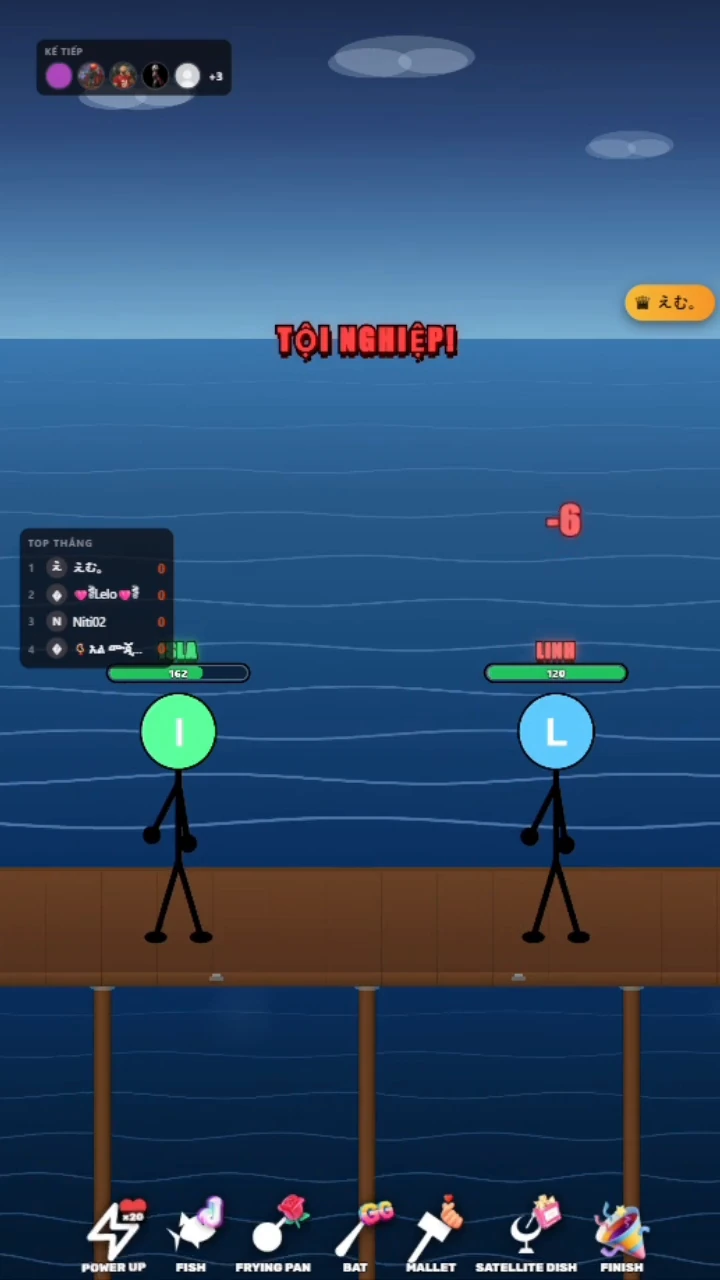
A readable duel
Two fighters share one stage, with colored health bars and damage feedback that viewers can follow at a glance.
VoxRumble gameplay: a waterside stick-fighter duel with HP changes and impact feedback.
Your browser does not support this video.
Interactive Windows games
A small stage. A crowd with a say.
Put your LIVE audience at ringside. Two stick fighters trade blows above the water while viewer interactions shape the next exchange.
USD 31.50
One-time payment; no automatic renewalCurrently unavailable for purchase.
Digital delivery usually takes 15 minutes after payment verification. In exceptional circumstances, allow up to 24 hours.
Setup & Support ↓Overview
A wooden platform, open water and two stick fighters: VoxRumble gives your LIVE a ringside view of a running duel. Colored HP bars and on-screen damage make the exchange easy to follow, with impact effects marking each hit. The fighters take their turns automatically. Your audience brings the changes around them: supported comments and Follow events feed the battle queue, while configured gifts and likes influence the contest. Watch the health bars shift and see which fighter holds on through the exchange. Use the game’s existing event settings to shape participation for your stream. Review the exact triggers and gift mappings below, then try the setup before going live. The gameplay clip shows the arena in action; the cover is a promotional illustration.
Two fighters share one stage, with colored health bars and damage feedback that viewers can follow at a glance.
Supported comments, gifts, likes and received Follow events connect the crowd to the queue and the action.
Keep control of the game’s existing gift actions, attack counts and healing values for your livestream setup.
Prepare the queue and existing gift settings, connect your supported LIVE session, and let the fighters exchange attacks. Follow HP changes and the supporter panel while your audience takes part.
Gift: Equip weapons, increase attack strength, heal, defeat opponents or prioritize a player in the queue. Like: Every 20 likes restores 30 HP to the supported side by default; configurable. Follow: Adds the viewer to the battle queue when a Follow event is actually received. Comment: Comment to join the game and queue. Share: No separate trigger Join LIVE / Member: No separate trigger Subscribe: No separate trigger Join Team: No separate trigger
TikTok LIVE
Equip weapons, increase attack strength, heal, defeat opponents or prioritize a player in the queue.
Every 20 likes restores 30 HP to the supported side by default; configurable.
Adds the viewer to the battle queue when a Follow event is actually received.
Comment to join the game and queue.
Share — No separate trigger
Join LIVE / Member — No separate trigger
Subscribe — No separate trigger
Join Team — No separate trigger
| LIVE event | Features |
|---|---|
| TikTok | Equip Fish |
| Rose | Equip Frying Pan |
| GG | Equip Bat |
| Finger Heart | Equip Mallet |
| Perfume | Equip Satellite Dish |
| Confetti | Defeat the opponent immediately |
Gift/coin thresholds and actions are configurable in the game. Coins are not fixed USD prices or permanent TikTok gift valuations. Event availability depends on the actual connection and eligible account.
Automatic interaction queue
gift priority by total coin value
two fighters take turns
HP recovery through likes or gifts
configurable gift/action and weapon attack counts
adjustable healing
supporter leaderboard.
Windows desktop software
Recommended reference configuration. Actual minimum requirements have not been established by benchmarks.
Windows 10 / Windows 11. Windows PC only. Android, iOS, macOS and Linux are not supported. Internet is required for TikTok LIVE features.
Activate the game, then enter your TikTok channel ID. Broadcast with TikTok LIVE Studio or OBS where your account and streaming method are supported. Check the supplied installation guide for any required application runtimes.
Windows game files, activation key, installation instructions, activation and TikTok LIVE setup guide, and support contact. Delivered manually via the agreed WhatsApp or Telegram conversation.
Install or extract the supplied game files on a compatible Windows computer using the product-specific instructions.
Open the game and enter the supplied activation key first.
After the key is accepted, enter your TikTok channel ID in the game. Use only the supported LIVE interactions.
Configure supported event actions in the game settings.
Try your setup before your livestream.
Purchases are currently unavailable. Contact KATTTIK on WhatsApp or Telegram with product and setup questions. Once payments are activated, we will confirm the license and listed USD price, send an order-specific Creem link, verify payment and deliver the files and key manually. No website account is required.
Digital delivery usually takes 15 minutes after payment verification. In exceptional circumstances, allow up to 24 hours.
Send a support request at any time. We respond within 2 business days.
[email protected]Perpetual license · one-time payment · 1 Windows PC. Use starts after successful key activation and does not expire with time, subject to the Terms. Concurrent use on multiple devices, resale, transfer and key sharing are not automatically permitted.
Contact WhatsApp or Telegram for a device change or key reset. Requests are reviewed individually; proof of ownership and activation status may be required. Approval, free transfers and unlimited resets are not guaranteed.
Terms of Service · Delivery PolicyKATTTIK sells digital software licenses delivered electronically as game files and activation keys after payment verification. There are no physical goods to return. Purchases are generally final after the correct software and a valid key have been successfully delivered and activated. We do not normally refund solely for a change of mind after successful delivery or activation.
Refund PolicyTwo stick fighters exchange attacks on a wooden platform above the water. Colored HP bars, damage numbers and impact effects show the state of the duel.
The two fighters attack automatically in turns. Viewer participation uses the supported events and existing settings shown on this page.
VoxRumble supports Gift, Like and Comment actions, plus queue entry when a Follow event is received. See the interaction and gift tables for the exact behavior; other event types are not advertised as separate triggers.
For Windows 10 and Windows 11 PCs. Android, iOS, macOS and Linux are not supported. Internet access is required for TikTok LIVE features.
Open your game, enter the activation key, then enter your TikTok channel ID.
Contact WhatsApp or Telegram for a device change or key reset. Requests are reviewed individually; proof of ownership and activation status may be required. Approval, free transfers and unlimited resets are not guaranteed.
Include your Creem Order ID, game name, software version and error description. Send sensitive information only in the agreed private support channel. Support requests accepted 24/7. Responses within 2 business days. This is not instant live support.
Purchases are generally final after correct delivery and successful activation. Contact us about delivery failures, invalid keys, duplicate charges or other problems; applicable consumer rights remain protected.