Gift
SupportedTrigger configurable team actions: add blocks, steal progress, boost speed, add a win, or summon Phoenix and Dragon effects.
Your browser does not support this video.
Interactive Windows games
Bring your TikTok LIVE audience into a real-time bridge-building competition between Boys and Girls.
USD 31.50
One-time payment; no automatic renewalCurrently unavailable for purchase.
Digital delivery usually takes 15 minutes after payment verification. In exceptional circumstances, allow up to 24 hours.
Setup & Support ↓Overview
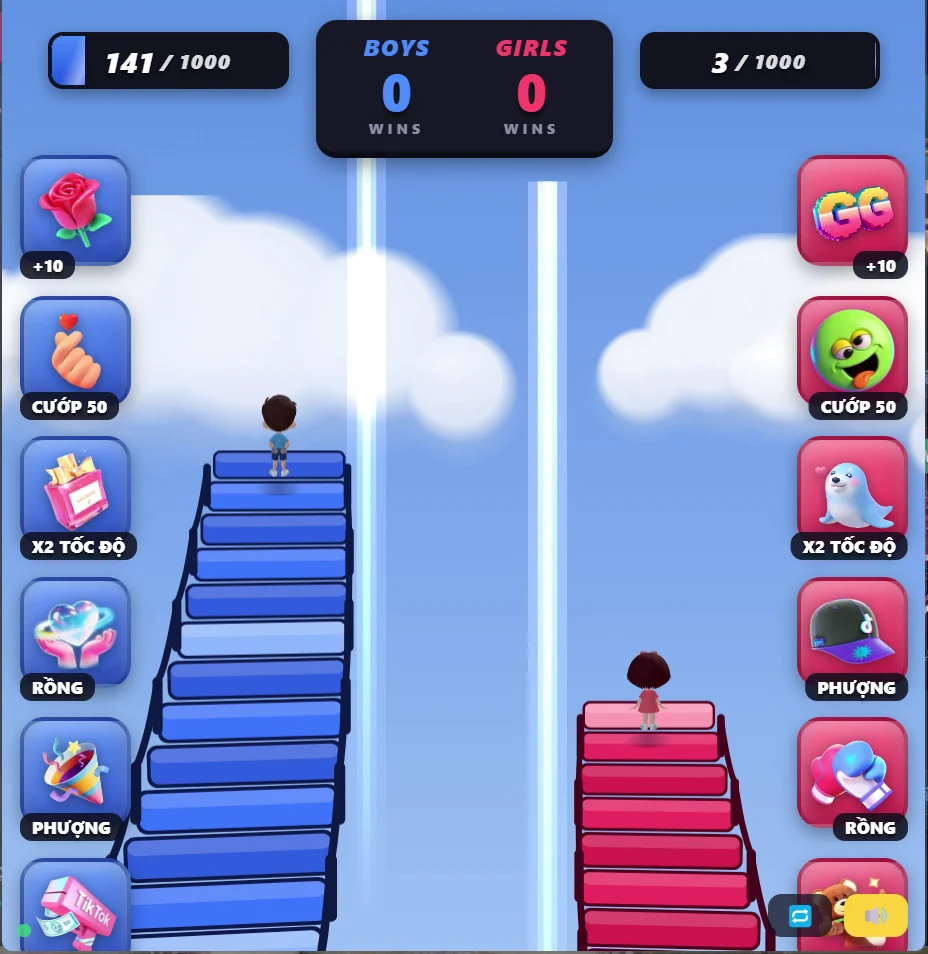
Bridge Race is an interactive TikTok LIVE game where viewers support competing teams through gifts, likes, follows, comments, and shares. Each team races to build its bridge, gain progress, and earn victories. Viewers can trigger configurable actions such as adding blocks, stealing progress, activating speed boosts, and summoning Phoenix or Dragon effects. Customize the gift mappings, event actions, like thresholds, and team comment keywords to create your own interactive livestream experience.
Gift: Trigger configurable team actions: add blocks, steal progress, boost speed, add a win, or summon Phoenix and Dragon effects. Like: Default: 200 eligible likes add 10 Blocks to the corresponding team. The threshold and action can be changed. Follow: A received Follow event supports Boys by default. Configure the target team and action in settings. Comment: Default keywords: "1" joins Boys; "2" joins Girls. Team keywords and actions can be changed. Share: A received Share event supports Girls by default. Configure the target team and action in settings.
TikTok LIVE
Trigger configurable team actions: add blocks, steal progress, boost speed, add a win, or summon Phoenix and Dragon effects.
Default: 200 eligible likes add 10 Blocks to the corresponding team. The threshold and action can be changed.
A received Follow event supports Boys by default. Configure the target team and action in settings.
Default keywords: "1" joins Boys; "2" joins Girls. Team keywords and actions can be changed.
A received Share event supports Girls by default. Configure the target team and action in settings.
Join LIVE / Member — No dedicated action is currently supported.
Subscribe — No dedicated action is currently supported.
Join Team — No dedicated action is currently supported.
Build 10 additional bridge blocks for the supported team.
Steal up to 50 blocks from the opposing team, limited by its available progress.
Double bridge-building speed for 15 seconds. Stacking follows the game’s actual effect rules.
Add one victory to the supported team.
Summon Phoenix to advance the supported team by 100 bridge blocks.
Summon Dragon to attack the opposing team and destroy up to 100 of its bridge blocks.
| TikTok Gift | Action |
|---|---|
| Rose | +10 Blocks |
| Finger Heart | Steal 50 |
| Perfume | 2x Speed |
| Money Gun | +1 Win |
| Confetti | Phoenix +100 |
| Hand Heart | Dragon -100 |
| TikTok Gift | Action |
|---|---|
| GG | +10 Blocks |
| Overreact | Steal 50 |
| Little Kisses | 2x Speed |
| Amazing | +1 Win |
| Cap | Phoenix +100 |
| Boxing Gloves | Dragon -100 |
Gift mappings, event triggers, thresholds, and in-game actions can be customized in the game settings.
Windows desktop software
Contact us with your PC specifications before purchase so we can confirm a suitable setup.
Windows PC software. Internet is required for TikTok LIVE. Contact us to confirm compatibility with your Windows version.
Activate the game, then enter your TikTok channel ID. Broadcast with TikTok LIVE Studio or OBS where your account and streaming method are supported. Check the supplied installation guide for any required application runtimes.
Windows game files, activation key, installation instructions, activation and TikTok LIVE setup guide, and support contact. Delivered manually via the agreed WhatsApp or Telegram conversation.
Install or extract the supplied game files on a compatible Windows computer using the product-specific instructions.
Open the game and enter the supplied activation key first.
After the key is accepted, enter your TikTok channel ID in the game. Use only the supported LIVE interactions.
Configure supported event actions in the game settings.
Try your setup before your livestream.
Select or configure Boys and Girls, review each team’s gift mappings and the Like, Follow, Comment and Share actions, then start a round. Use Demo mode to try the configured actions.
Choose a game and contact KATTTIK on WhatsApp or Telegram. We confirm the license and listed USD price, then send an order-specific Creem payment link. After verifying successful payment in Creem, we send the game file and activation key manually through the agreed chat channel. No website account is required.
Digital delivery usually takes 15 minutes after payment verification. In exceptional circumstances, allow up to 24 hours.
Send a support request at any time. We respond within 2 business days.
[email protected]Perpetual license · one-time payment · 1 Windows PC. Use starts after successful key activation and does not expire with time, subject to the Terms. Concurrent use on multiple devices, resale, transfer and key sharing are not automatically permitted.
Contact WhatsApp or Telegram for a device change or key reset. Requests are reviewed individually; proof of ownership and activation status may be required. Approval, free transfers and unlimited resets are not guaranteed.
Terms of Service · Delivery PolicyKATTTIK sells digital software licenses delivered electronically as game files and activation keys after payment verification. There are no physical goods to return. Purchases are generally final after the correct software and a valid key have been successfully delivered and activated. We do not normally refund solely for a change of mind after successful delivery or activation.
Refund PolicyDefault keywords: "1" joins Boys; "2" joins Girls. Team keywords and actions can be changed.
Gift mappings, event triggers, thresholds, and in-game actions can be customized in the game settings.
Perpetual license · one-time payment · {{device_limit}} Windows PC. Use starts after successful key activation and does not expire with time, subject to the Terms. Concurrent use on multiple devices, resale, transfer and key sharing are not automatically permitted.
Contact us on WhatsApp or Telegram. After payment verification through Creem, receive the files and key manually. Enter the key first, then your TikTok channel ID.
Contact WhatsApp or Telegram for a device change or key reset. Requests are reviewed individually; proof of ownership and activation status may be required. Approval, free transfers and unlimited resets are not guaranteed.